Consumer Tech News and Headlines
  • All Technology
  • AI
  • Autonomy
  • B2B Growth
  • Big Data
  • BioTech
  • ClimateTech
  • Consumer Tech
  • Crypto
  • Cybersecurity
  • DevOps
  • Digital Marketing
  • Ecommerce
  • EdTech
  • Enterprise
  • FinTech
  • GovTech
  • Hardware
  • HealthTech
  • HRTech
  • LegalTech
  • Nanotech
  • PropTech
  • Quantum
  • Robotics
  • SaaS
  • SpaceTech
AllNewsDealsSocialBlogsVideosPodcastsDigests

Consumer Tech Pulse

EMAIL DIGESTS

Daily

Every morning

Weekly

Sunday recap

NewsDealsSocialBlogsVideosPodcasts
Consumer TechNewsDell XPS 14 (2026) Review: Two Steps Forward
Dell XPS 14 (2026) Review: Two Steps Forward
Consumer Tech

Dell XPS 14 (2026) Review: Two Steps Forward

•February 17, 2026
0
Tom's Hardware
Tom's Hardware•Feb 17, 2026

Why It Matters

The XPS 14 reestablishes Dell’s presence in the high‑end ultrabook market, offering competitive performance and battery life that challenge Apple’s MacBook Pro. Its design and pricing signal Dell’s commitment to premium Windows laptops, influencing buyer choices in the enterprise and creator segments.

Key Takeaways

  • •Starts at $1,599, OLED at $2,199.
  • •20.7‑hour battery life on 1080p model.
  • •Intel Core Ultra X7 358H outperforms rivals.
  • •Physical function row returns, boosting workflow efficiency.
  • •Shallow 0.8 mm keyboard reduces tactile feedback.

Pulse Analysis

Dell’s 2026 XPS 14 arrives at a pivotal moment for premium Windows laptops, where consumers expect both portability and power. By adopting Intel’s Core Ultra Series 3 silicon, the device delivers a notable leap in multi‑core throughput, rivaling the latest Apple M‑series chips in benchmark tests. The inclusion of a variable‑refresh OLED panel adds a visual premium that appeals to designers and media professionals, while the 1080p option prioritizes endurance, achieving more than 20 hours of mixed‑use battery life—an impressive figure that narrows the gap with Apple’s MacBook Pro.

Beyond raw specs, Dell’s design choices address past criticisms. The reintroduced physical function row and tactile borders around the touchpad restore familiar productivity cues that were missing in recent XPS iterations. Although the lattice‑free keyboard’s 0.8 mm travel reduces tactile feedback, the overall ergonomics benefit from a lighter 3‑lb chassis and a compact footprint, making the XPS 14 a strong contender for mobile professionals who travel frequently. The device also supports easy upgrades, with removable SSDs and a replaceable battery, extending its service life in corporate environments.

From a market perspective, the XPS 14’s pricing strategy—starting at $1,599 for the base model and capping at $2,199 for the OLED variant—places it squarely against high‑end competitors like the MacBook Pro and Asus ZenBook Duo. Its blend of performance, battery endurance, and premium build quality could shift purchasing decisions toward Windows‑based ultrabooks, especially for enterprises seeking flexible, upgradeable hardware without sacrificing flagship aesthetics. As Dell continues to refine the XPS line, the 2026 model sets a new benchmark for what a premium Windows laptop can deliver.

Dell XPS 14 (2026) review: Two steps forward

Andrew E. Freedman · Senior Editor, Tom's Hardware · February 19 2026

Dell is headed in the right direction with the XPS 14, and I can recommend it again. It offers a lightweight design, nice speakers, and a solid webcam — and it brings back a physical function row. I wish the keyboard had more feedback, and you'll need to save up for even entry‑level configurations.

Pros

  • Attractive, lightweight design

  • Strong battery life on the 1080p model

  • Tandem OLED display option looks great

  • Physical function row and borders on the touchpad

  • Surprisingly good speakers

  • The XPS name is back!

Cons

  • Low‑travel, lattice‑free keyboard made me more error‑prone

  • Starts at $1,600

The Dell XPS 14 is back, and it was badly in need of reinvention. Following a poorly executed name change and some design choices that favored looks over functionality, the new system is a vast improvement. Starting at $1,599.99, the new Dell XPS 14 (DA14260) is lighter, smaller, and more functional than it has been in years, with a physical function row and tactile bars marking where the touchpad is. You get strong performance from Intel's new Core Ultra Series 3 processors, incredible battery life on the 1080p model — arguably enough already to consider it one of the best ultrabooks — with a screen boasting a variable refresh rate that goes down as low as 1 Hz.

The shallow keyboard remains divisive, but updates to the speakers and an option for a tandem OLED help make the XPS feel fresh.

Design of the Dell XPS 14 (2026)

What a difference a few small changes can make. The Dell XPS 14 is a lovely little machine that, like the Dell XPS 13 Plus and Dell 14 Premium before it, is clearly made in the image of the MacBook Air.

First and foremost, a year after ditching the XPS brand name, Dell has brought it back and slapped it right on the lid. There's no Dell logo on the otherwise spartan aluminum top — it's all XPS. Dell’s logo can be found on the bottom of the system.

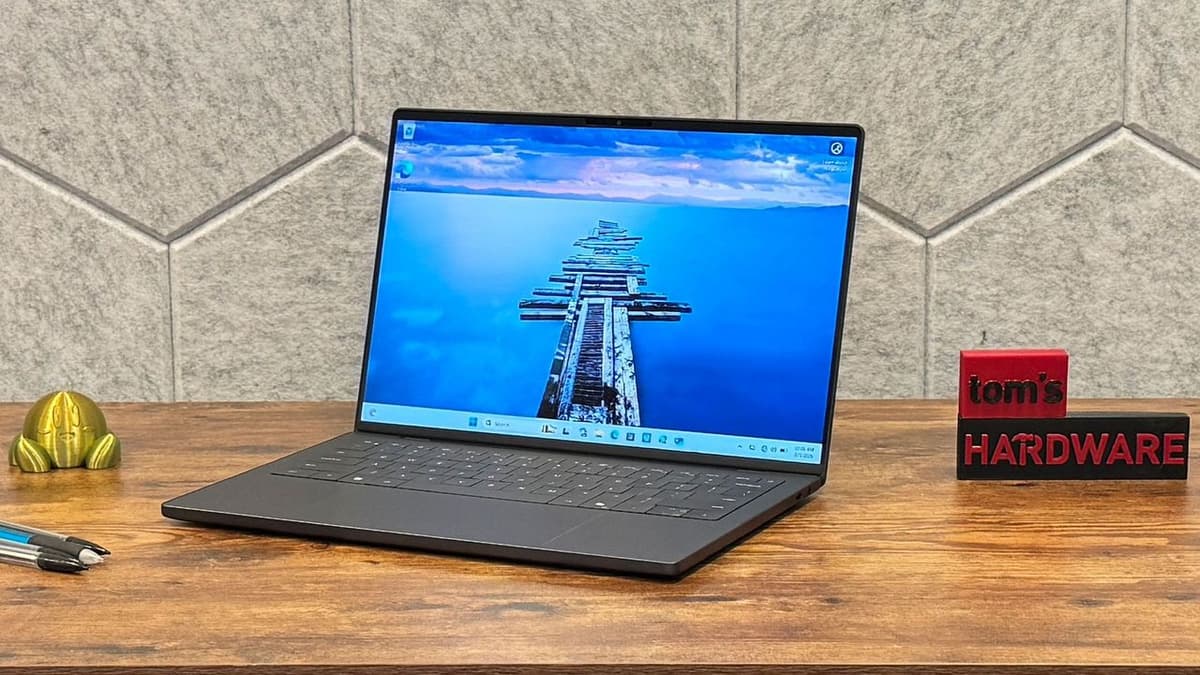
Image 1: Dell XPS 14 (2026)

(Image credit: Tom's Hardware)

Our system came in graphite gray. As of this writing, Dell doesn't have a lighter “platinum” version available, though Dell tells me a lighter option, “shimmer,” is on the way, which should resemble a champagne shade. When you lift the lid, the XPS 14 is slightly less austere than previous models. While the display still has a minimal InfinityEdge bezel, it doesn't have the same wow factor as it did even a few years ago. Many of Dell's competitors have thinned down their bezels to match.

What is impressive is what Dell brought back and what it added: a function row and subtle barriers on either side of the touchpad. The touchpad's barriers are subtle lines that indicate where the haptic touchpad stops, giving more reassurance when using the device.

Image 2: Dell XPS 14 (2026)

(Image credit: Tom's Hardware)

Along the edges of the wrist rest, there is a noticeable edge. It's not sharp, but you'll notice it if you carry your laptop open by the wrist rest. This also seems to be a major part of how the keyboard is held in, because the deck comes out for upgrades and repairs.

Image 3: Dell XPS 14 (2026)

(Image credit: Tom's Hardware)

The sides of the laptop have minimal, but just enough, ports. The left features two Thunderbolt 4 (USB‑C) ports, while the right features a third Thunderbolt port and a 3.5 mm headphone jack. Dell claims that each of the USB‑C ports can also be used as Kensington lock slots.

The XPS 14 now starts at just 3 lb and measures 12.19 × 8.26 × 0.58 in. For comparison, the MacBook Pro with M5 is 3.4 lb and 212.31 × 8.71 × 0.61 in; the Asus Zenbook Duo is 12.21 × 8.21 × 0.92 in and weighs 3.64 lb.

Dell XPS 14 (2026) Specifications

| Component | OLED Model | 1080p Model |

|-----------|------------|-------------|

| CPU | Intel Core Ultra X7 358H | Intel Core Ultra 7 355 |

| Graphics | Intel Arc B390 (integrated) | Intel Graphics (integrated) |

| Memory | 32 GB LPDDR5x‑9600 | 16 GB LPDDR5x‑7467 |

| Storage | 1 TB PCIe Gen 4 SSD | 512 GB PCIe Gen 4 SSD |

| Display | 14‑in, 2880 × 1800, OLED, touch, 20‑120 Hz, InfinityEdge | 14‑in, 1920 × 1080, non‑touch, 1‑120 Hz, InfinityEdge |

| Networking | Intel Wi‑Fi 7 BE211, Bluetooth 6.0 | Same |

| Ports | 3 × Thunderbolt 4 (USB‑C), 3.5 mm audio jack, Kensington lock support | Same |

| Camera | 8 MP HDR webcam, Windows Hello with IR | Same |

| Battery | 70 WHr | Same |

| Power Adapter | 100 W USB‑C | Same |

| OS | Windows 11 Pro | Same |

| Dimensions (W × D × H) | 12.19 × 8.26 × 0.58 in (309.52 × 208.71 × 14.62 mm) | 12.19 × 8.26 × 0.60 in (309.52 × 208.71 × 15.20 mm) |

| Weight | 3 lb (1.36 kg) | Same |

| Price (as configured) | $2,199.99 | $1,699.99 |

Productivity Performance

We tested two configurations. The high‑end model with an Intel Core Ultra X7 358H handily beat the Intel Core Ultra 7 355. The X7 has twice as many cores. Compared to the Asus Zenbook Duo (Core Ultra X9 388H) and a MacBook Pro with Apple’s M5, the XPS 14 performed strongly in most benchmarks.

  • Geekbench 6: X7 388H – 2,867 (single) / 16,927 (multi); Ultra 7 355 – 2,685 / 7,964.

  • File Transfer: 1 TB SSD – 1,419.76 MB/s; 512 GB SSD – 1,730.36 MB/s.

  • Handbrake 4K → 1080p: Ultra X7 – 4 min 30 s; Ultra 7 – 6 min 45 s.

  • Cinebench 2026: 16‑core Ultra X7 outperformed the 8‑core Ultra 7.

Graphics

Testing Intel’s integrated graphics showed a clear advantage for the Arc B390 (12 Xe cores) over the standard Intel Graphics (4 Xe cores).

  • 3DMark Steel Nomad: X7 388H – 1,446; Ultra 7 355 – 532; Zenbook Duo (X9) – 1,483.

Display

The tandem OLED touchscreen (2880 × 1800) delivers vivid colors, deep blacks, and a variable refresh rate down to 1 Hz. The 1080p LCD is adequate for productivity but lacks the visual punch of the OLED.

  • Brightness: OLED – 365 nits; LCD – 466 nits; MacBook Pro mini‑LED – 558 nits.

  • Color Gamut: OLED – 89.7 % DCI‑P3, 126.6 % sRGB; LCD – 71.4 % DCI‑P3, 100.8 % sRGB.

Keyboard and Touchpad

The return of a physical function row is welcome. The lattice‑free keyboard has very shallow 0.8 mm travel, resulting in reduced tactile feedback and a higher error rate for some users. Typing tests showed 105 wpm with ~95 % accuracy (down from ~98 % normally).

The haptic touchpad now includes subtle raised borders, improving spatial awareness. Users can adjust click intensity in Windows 11 settings.

Audio

A 10‑W quad‑speaker system (two 3 W mains, two 2 W tweeters) provides clear, loud sound, though low‑end response is limited.

Upgradeability

Despite its thin chassis, the XPS 14 can be opened for repairs and upgrades:

  1. Remove four Torx T5H screws on the bottom.

  2. Flip the laptop onto its side and use a spudger to disengage the keyboard deck via two hinge‑adjacent holes.

  3. Displace three clips per side to free the palm‑rest assembly (connected to battery and motherboard).

  4. The SSD heatsink can be removed; the unit uses an M.2 2230 SSD with space for an 2280 drive.

  5. The battery is removable (seven screws).

  6. Wi‑Fi module and RAM are soldered; USB‑C ports are screw‑secured.

Battery Life

  • 1080p model: 20 h 41 min (web browsing, video streaming, OpenGL at 150 nits).

  • OLED model: 12 h 23 min.

  • MacBook Pro (M5): 18 h 14 min.

The XPS 14 ships with an “adaptive” charge mode that may cap charging at 80 % after prolonged plugged‑in use; this can be changed in the BIOS.

Heat

During a Cinebench stress test:

  • X7 388H: Keyboard 91.5 °F, touchpad 83.5 °F, bottom 104.5 °F; CPU 63.6 °C.

  • Ultra 7 355: Keyboard 91.5 °F, touchpad 84.5 °F, bottom 103.5 °F; CPU 72.1 °C.

Webcam

An 8‑MP HDR webcam with IR for Windows Hello delivers sharp, color‑accurate images even under fluorescent lighting.

Software and Warranty

Pre‑installed Dell software includes:

  • Dell Optimizer – device info, thermal management, charging options.

  • Dell Trusted Device – security scoring.

  • Dell Command – BIOS/driver/firmware updates.

  • Dell SupportAssist – hardware scans and support.

Warranty: one‑year Dell Care Plus; optional Dell Care Premium upgrade for $89 (24/7 support).

Configurations Tested

  • High‑end: Intel Core Ultra X7 358H, Arc B390, 32 GB RAM, 1 TB SSD, tandem OLED – $2,199.99.

  • Entry‑level: Intel Core Ultra 7 355, Intel Graphics, 16 GB RAM, 512 GB SSD, 1080p display – $1,699.99.

A lower‑priced model with Core Ultra 5 325 starts at $1,599.99.

Bottom Line

The Dell XPS 14 is a minimalist, lightweight workhorse that corrects many of Dell’s recent missteps. The restored XPS branding, function row, and touchpad borders make it more practical. The 1080p variant excels in battery life (over 20 hours), while the OLED model offers superior visuals. The shallow, lattice‑free keyboard may require an adjustment period, and the starting price (~$1,600) reflects current RAM market pressures.

Overall, Dell is moving in the right direction, delivering a portable, high‑performance Windows laptop that can compete with premium offerings from Apple and other manufacturers.

Read Original Article
0

Comments

Want to join the conversation?

Loading comments...