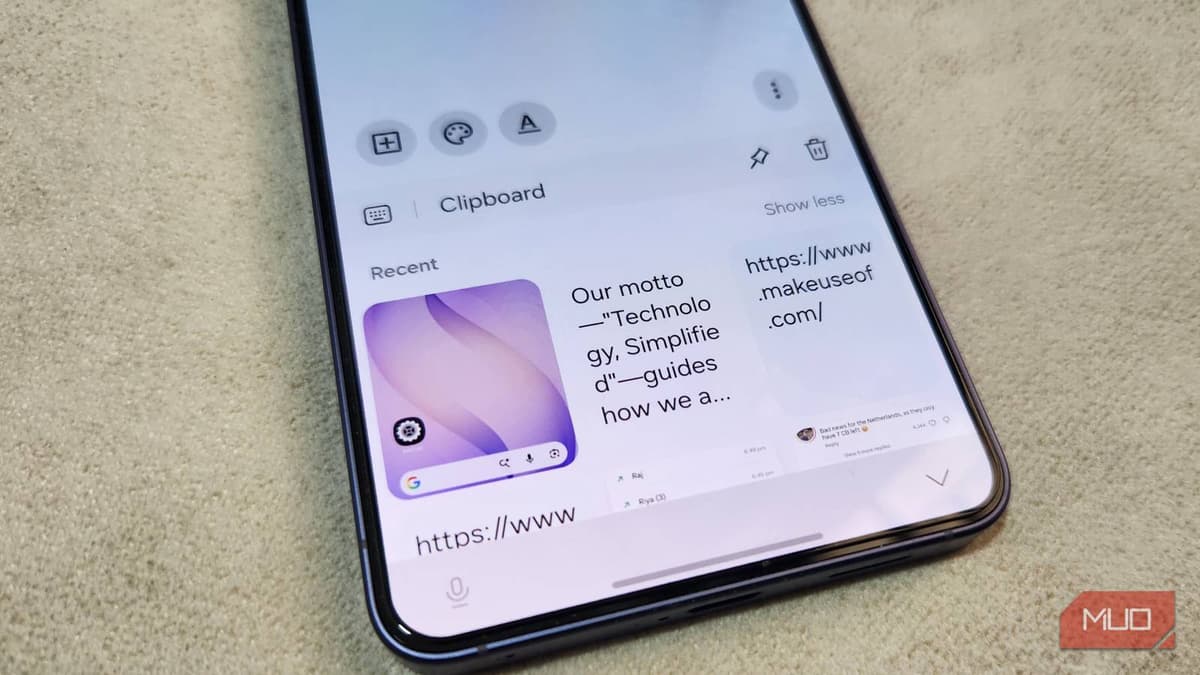
Your Samsung Phone Has a Better Clipboard than You Think
Companies Mentioned
Why It Matters
The unified clipboard turns a basic copy‑paste function into a productivity hub, reducing context‑switching and boosting efficiency for mobile‑first professionals. Its cross‑device sync differentiates Samsung from competitors and deepens ecosystem lock‑in.
Key Takeaways
- •Samsung Keyboard clipboard accessible via toolbar or Edge panel
- •Supports text, images, and screenshots in one history
- •Syncs clipboard across Galaxy phones, tablets, and Windows PCs
- •Edge panel provides instant swipe‑in access from any screen
- •Default enabled; no third‑party app required for basic use
Pulse Analysis
Samsung’s clipboard has quietly evolved into a robust productivity tool built directly into the default keyboard. By tapping the clipboard icon—or adding it from the three‑dot menu—users gain a persistent history that stores not only text but also images and screenshots. Because the feature is enabled out of the box, there’s no need to install third‑party keyboards, and the interface feels native to Android, preserving the familiar swipe and tap gestures that power daily mobile workflows.
The real differentiator is the Edge panel integration, which places the clipboard at the edge of the screen for instant access. A simple swipe reveals a scrollable list of recent copies, allowing users to drag and drop items into any app without navigating away. This on‑the‑fly accessibility cuts down on the time spent reopening the keyboard or hunting through menus, a benefit that resonates with professionals who juggle emails, documents, and messaging apps on the same device.
Beyond the phone, Samsung extends clipboard history across the Galaxy ecosystem and Windows PCs via the Samsung account and Phone Link. When devices share the same Wi‑Fi network and have Bluetooth enabled, copied content syncs automatically, creating a seamless bridge between mobile and desktop environments. For enterprises, this means reduced friction when moving data between presentations, spreadsheets, and collaborative tools, reinforcing Samsung’s ecosystem lock‑in and offering a compelling alternative to Apple’s continuity features. The integrated clipboard thus serves as a subtle yet powerful catalyst for efficiency in a multi‑device workplace.
Your Samsung phone has a better clipboard than you think
Comments
Want to join the conversation?
Loading comments...