These 3 Buried Android Auto Settings Stopped My Phone From Cutting Out in the Car
Companies Mentioned
Why It Matters
These tweaks transform Android Auto from a glitch‑prone add‑on into a reliable, productivity‑enhancing tool, encouraging broader adoption in both consumer and fleet markets.
Key Takeaways
- •Lock Android Auto theme to day or night to stop flicker
- •Manually set video resolution to 1920×1080 for stable display
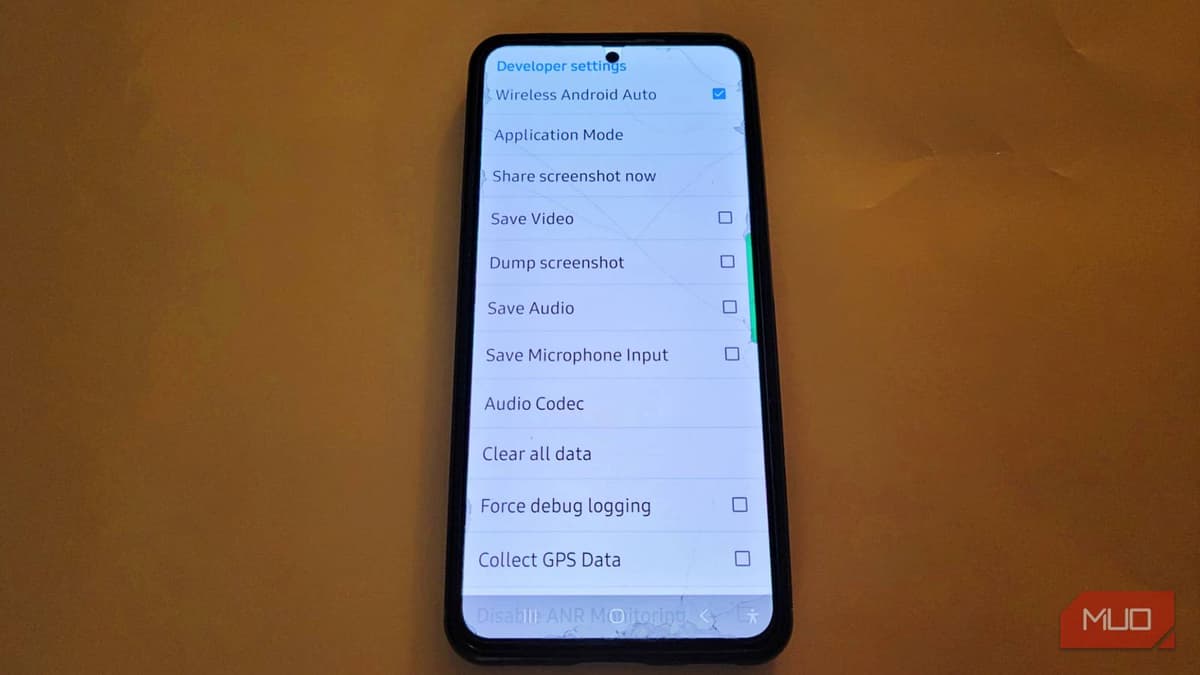
- •Enable Unknown Sources in developer settings to run custom apps
- •Force fixed resolution to skip automatic negotiation and reduce lag
- •Leave other developer options unchanged to avoid unintended system issues
Pulse Analysis
Android Auto has become a cornerstone of modern infotainment, promising a seamless bridge between smartphones and vehicle dashboards. Yet many drivers experience intermittent lag, flickering maps, or missing apps, leading to frustration and safety concerns. While manufacturers often point to hardware incompatibilities, the real bottleneck frequently lies in software defaults that prioritize automatic adjustments over consistency. Understanding and customizing these defaults can dramatically improve the user experience, turning a potentially distracting system into a dependable co‑pilot.
The developer menu hides three powerful controls. First, fixing the UI theme—day or night—prevents the system from redrawing the interface each time ambient light shifts, eliminating the stutter that can obscure navigation cues. Second, overriding the automatic resolution handshake and selecting a static 1920 × 1080 output reduces the handshake latency and ensures crisp visuals, especially on larger head‑units. Finally, toggling the Unknown Sources option unlocks sideloaded or third‑party apps, allowing users to integrate niche music players or specialized tools without waiting for official certification. Implementing these changes requires only a few taps, yet they collectively stabilize the connection, boost visual fidelity, and expand functional reach.
For automakers and fleet operators, the lesson is clear: empowering drivers with granular control can enhance safety, reduce support tickets, and differentiate infotainment offerings. As vehicles become increasingly software‑centric, manufacturers should consider surfacing these settings in the standard UI rather than relegating them to hidden menus. Doing so not only improves the end‑user experience but also aligns with broader industry trends toward open, customizable platforms, fostering a more resilient ecosystem for future mobility solutions.
These 3 buried Android Auto settings stopped my phone from cutting out in the car
Comments
Want to join the conversation?
Loading comments...