AI News and Headlines
  • All Technology
  • AI
  • Autonomy
  • B2B Growth
  • Big Data
  • BioTech
  • ClimateTech
  • Consumer Tech
  • Crypto
  • Cybersecurity
  • DevOps
  • Digital Marketing
  • Ecommerce
  • EdTech
  • Enterprise
  • FinTech
  • GovTech
  • Hardware
  • HealthTech
  • HRTech
  • LegalTech
  • Nanotech
  • PropTech
  • Quantum
  • Robotics
  • SaaS
  • SpaceTech
AllNewsDealsSocialBlogsVideosPodcastsDigests

AI Pulse

EMAIL DIGESTS

Daily

Every morning

Weekly

Sunday recap

NewsDealsSocialBlogsVideosPodcasts
AINewsBuilding a Healthcare Robot From Simulation to Deployment with NVIDIA Isaac
Building a Healthcare Robot From Simulation to Deployment with NVIDIA Isaac

AI

Building a Healthcare Robot From Simulation to Deployment with NVIDIA Isaac

•October 29, 2025
0
Hugging Face
Hugging Face•Oct 29, 2025

Why It Matters

By tightly integrating simulation, training, evaluation and deployment, the workflow aims to cut development time, reduce costly real‑world trials, and accelerate safe Sim2Real adoption in medical robotics.

Building a Healthcare Robot from Simulation to Deployment with NVIDIA Isaac

Building a Healthcare Robot from Simulation to Deployment with NVIDIA Isaac

Published: October 29, 2025

Authors: Steven Palma, Andres Diaz‑Pinto


TL;DR

A hands‑on guide to collecting data, training policies, and deploying autonomous medical robotics workflows on real hardware.


Introduction

Simulation has been a cornerstone in medical imaging to address the data gap. However, in healthcare robotics it has often been too slow, siloed, or difficult to translate into real‑world systems.

NVIDIA Isaac for Healthcare, a developer framework for AI healthcare robotics, enables developers to solve these challenges by offering integrated data collection, training, and evaluation pipelines that work across both simulation and hardware. The v0.4 release provides an end‑to‑end SO‑ARM starter workflow and a “bring‑your‑own‑operating‑room” tutorial. The SO‑ARM starter workflow lowers the barrier for MedTech developers to experience the full workflow from simulation to train to deployment and start building and validating autonomous systems on real hardware right away.

In this post we walk through the starter workflow and its technical implementation details to help you build a surgical assistant robot in less time than ever imagined.


SO‑ARM Starter Workflow; Building an Embodied Surgical Assistant

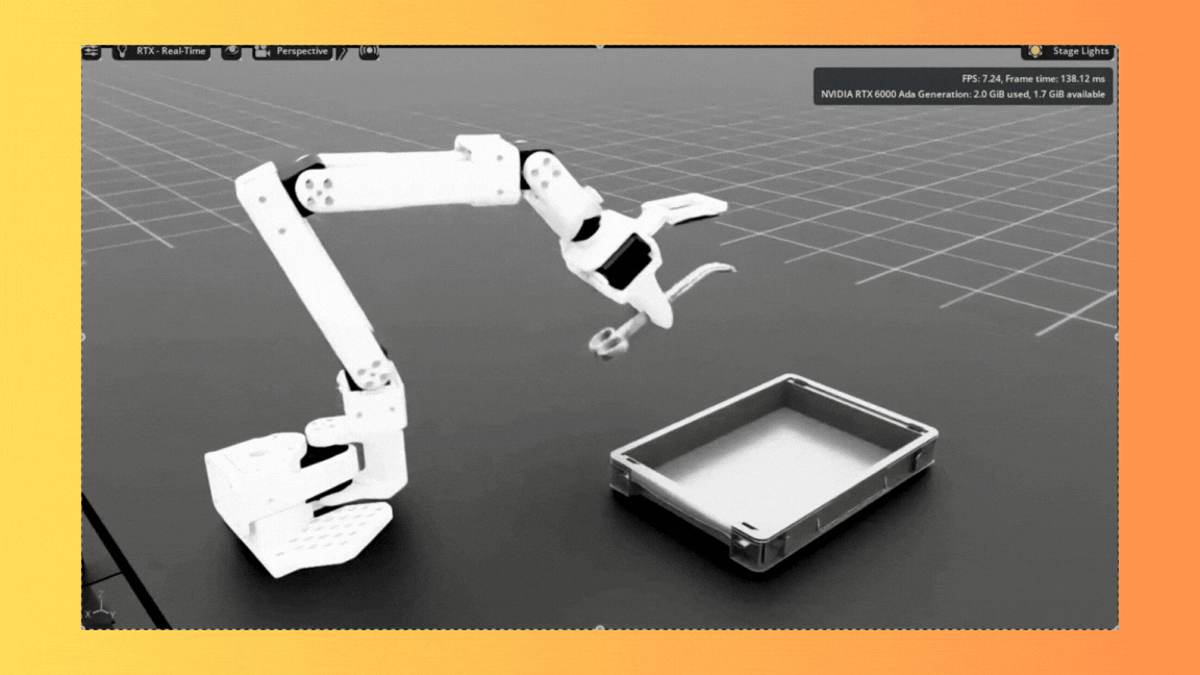
The SO‑ARM starter workflow introduces a new way to explore surgical assistance tasks, providing developers with a complete end‑to‑end pipeline for autonomous surgical assistance:

  • Collect real‑world and synthetic data with SO‑ARM using LeRobot

  • Fine‑tune GR00t N1.5, evaluate in IsaacLab, then deploy to hardware

This workflow gives developers a safe, repeatable environment to train and refine assistive skills before moving into the operating room.

Technical Implementation

The workflow implements a three‑stage pipeline that integrates simulation and real hardware:

  1. Data Collection: Mixed simulation and real‑world teleoperation demonstrations using SO101 and LeRobot

  2. Model Training: Fine‑tuning GR00T N1.5 on combined datasets with dual‑camera vision

  3. Policy Deployment: Real‑time inference on physical hardware with RTI DDS communication

Notably, over 93 % of the data used for policy training was generated synthetically in simulation, underscoring the strength of simulation in bridging the robotic data gap.

Sim2Real Mixed Training Approach

The workflow combines simulation and real‑world data to address the fundamental challenge that training robots in the real world is expensive and limited, while pure simulation often fails to capture real‑world complexities. The approach uses approximately 70 simulation episodes for diverse scenarios and environmental variations, combined with 10‑20 real‑world episodes for authenticity and grounding. This mixed training creates policies that generalize beyond either domain alone.

Hardware Requirements

The workflow requires:

  • GPU: RT Core‑enabled architecture (Ampere or later) with ≥ 30 GB VRAM for GR00T N1.5 inference

  • SO‑ARM101 Follower: 6‑DOF precision manipulator with dual‑camera vision (wrist and room). The SO‑ARM101 features WOWROBO vision components, including a wrist‑mounted camera with a 3D‑printed adapter

  • SO‑ARM101 Leader: 6‑DOF teleoperation interface for expert demonstration collection

Developers can run all simulation, training and deployment (3 computers needed for physical AI) on one DGX Spark.

Data Collection Implementation

Real‑world data collection with SO‑ARM101 hardware (or any supported LeRobot version):


python lerobot-record \

  --robot.type=so101_follower \

  --robot.port= \

  --robot.cameras="{wrist: {type: opencv, index_or_path: 0, width: 640, height: 480, fps: 30}, room: {type: opencv, index_or_path: 2, width: 640, height: 480, fps: 30}}" \

  --robot.id=so101_follower_arm \

  --teleop.type=so101_leader \

  --teleop.port= \

  --teleop.id=so101_leader_arm \

  --dataset.repo_id=/surgical_assistance/surgical_assistance \

  --dataset.num_episodes=15 \

  --dataset.single_task="Prepare and hand surgical instruments to surgeon"

Simulation‑based data collection:


# With keyboard teleoperation

python -m simulation.environments.teleoperation_record \

  --enable_cameras \

  --record \

  --dataset_path=/path/to/save/dataset.hdf5 \

  --teleop_device=keyboard


# With SO‑ARM101 leader arm

python -m simulation.environments.teleoperation_record \

  --port= \

  --enable_cameras \

  --record \

  --dataset_path=/path/to/save/dataset.hdf5

Simulation Teleoperation Controls

For users without physical SO‑ARM101 hardware, the workflow provides keyboard‑based teleoperation with the following joint controls:

| Joint | Positive | Negative |

|-------|----------|----------|

| 1 (shoulder_pan) | Q | U |

| 2 (shoulder_lift) | W | I |

| 3 (elbow_flex) | E | O |

| 4 (wrist_flex) | A | J |

| 5 (wrist_roll) | S | K |

| 6 (gripper) | D | L |

| R | Reset recording environment |

| N | Mark episode as successful |

Model Training Pipeline

After collecting both simulation and real‑world data, convert and combine datasets for training:


# Convert simulation data to LeRobot format

python -m training.hdf5_to_lerobot \

  --repo_id=surgical_assistance_dataset \

  --hdf5_path=/path/to/your/sim_dataset.hdf5 \

  --task_description="Autonomous surgical instrument handling and preparation"


# Fine‑tune GR00T N1.5 on mixed dataset

python -m training.gr00t_n1_5.train \

  --dataset_path /path/to/your/surgical_assistance_dataset \

  --output_dir /path/to/surgical_checkpoints \

  --data_config so100_dualcam

The trained model processes natural language instructions such as “Prepare the scalpel for the surgeon” or “Hand me the forceps” and executes the corresponding robotic actions. With LeRobot 0.4.0 you can fine‑tune Gr00t N1.5 natively in LeRobot!


End‑to‑End Sim Collect–Train–Eval Pipelines

Simulation is most powerful when it is part of a loop: collect → train → evaluate → deploy.

With v0.3, IsaacLab supports this full pipeline:

Generate Synthetic Data in Simulation

  • Teleoperate robots using keyboard or hardware controllers

  • Capture multi‑camera observations, robot states, and actions

  • Create diverse datasets with edge cases impossible to collect safely in real environments

Train and Evaluate Policies

  • Deep integration with Isaac Lab’s RL framework for PPO training

  • Parallel environments (thousands of simulations simultaneously)

  • Built‑in trajectory analysis and success metrics

  • Statistical validation across varied scenarios

Convert Models to TensorRT

  • Automatic optimization for production deployment

  • Support for dynamic shapes and multi‑camera inference

  • Benchmarking tools to verify real‑time performance

This reduces the time from experiment to deployment and makes Sim2Real a practical part of daily development.


Getting Started

Isaac for Healthcare SO‑ARM Starter Workflow is available now. To get started:

  1. Clone the repository

    
    git clone https://github.com/isaac-for-healthcare/i4h-workflows.git
    
    
  2. Choose a workflow – start with the SO‑ARM Starter Workflow for surgical assistance or explore other workflows

  3. Run the setup – each workflow includes an automated setup script (e.g., tools/env_setup_so_arm_starter.sh)


Resources

  • [GitHub Repository](https://github.com/isaac-for-healthcare/i4h-workflows) – Complete workflow implementations

  • [Documentation] – (full documentation link)


Read Original Article
0

Comments

Want to join the conversation?

Loading comments...