AI News and Headlines
  • All Technology
  • AI
  • Autonomy
  • B2B Growth
  • Big Data
  • BioTech
  • ClimateTech
  • Consumer Tech
  • Crypto
  • Cybersecurity
  • DevOps
  • Digital Marketing
  • Ecommerce
  • EdTech
  • Enterprise
  • FinTech
  • GovTech
  • Hardware
  • HealthTech
  • HRTech
  • LegalTech
  • Nanotech
  • PropTech
  • Quantum
  • Robotics
  • SaaS
  • SpaceTech
AllNewsDealsSocialBlogsVideosPodcastsDigests

AI Pulse

EMAIL DIGESTS

Daily

Every morning

Weekly

Sunday recap

NewsDealsSocialBlogsVideosPodcasts
AINewsAmazon’s Send to Alexa Plus Makes the Kindle Scribe Feel More Like a Productivity Device
Amazon’s Send to Alexa Plus Makes the Kindle Scribe Feel More Like a Productivity Device
Big DataAI

Amazon’s Send to Alexa Plus Makes the Kindle Scribe Feel More Like a Productivity Device

•February 12, 2026
0
The Verge (sitewide)
The Verge (sitewide)•Feb 12, 2026

Companies Mentioned

Amazon

Amazon

AMZN

Why It Matters

The feature deepens Amazon’s ecosystem, turning a note‑taking device into an actionable workflow hub and differentiating it from competing e‑ink tablets.

Key Takeaways

  • •Send to Alexa Plus integrates Kindle Scribe with AI assistant
  • •Summarizes notes, creates tasks, calendar events automatically
  • •Handles handwritten notes and PDFs despite color challenges
  • •Provides draft ideas but cannot edit original Scribe files
  • •Gives Amazon edge over Kobo Elipsa 2E competitors

Pulse Analysis

The Kindle Scribe has long been positioned as a premium e‑ink note‑taking device, but its value proposition has been largely limited to annotation and reading. By adding Send to Alexa Plus, Amazon bridges the gap between static note capture and dynamic digital workflows. Users can now push handwritten pages or PDFs directly to Alexa, where the AI parses the content, extracts key points, and formats them into actionable items. This seamless handoff eliminates the need for manual transcription, a pain point for professionals and caregivers who rely on quick information retrieval.

In practice, the feature shines in real‑world scenarios such as caregiving, project planning, and research. Alexa accurately summarizes both clear and color‑coded handwriting, creates calendar events from appointment notes, and even drafts scripts for insurance negotiations. However, the integration is not without flaws: it cannot modify the original Scribe file, and complex outlines may require multiple prompts to achieve precision. These limitations suggest that while the tool is a powerful assistant, users should still treat it as a supplement rather than a replacement for traditional editing workflows.

Strategically, Send to Alexa Plus strengthens Amazon’s competitive moat against rivals like the Kobo Elipsa 2E, which lacks native voice‑assistant support. By embedding AI capabilities into its hardware ecosystem, Amazon encourages deeper user lock‑in and opens new revenue streams through potential premium Alexa services. As AI assistants become more ubiquitous, the ability to convert analog inputs into digital actions will likely become a baseline expectation, positioning the Kindle Scribe as a forward‑looking productivity platform rather than just a digital notebook.

Amazon’s Send to Alexa Plus makes the Kindle Scribe feel more like a productivity device

By Sheena Vasani, Commerce Writer · Feb 12 2026, 2:04 PM UTC

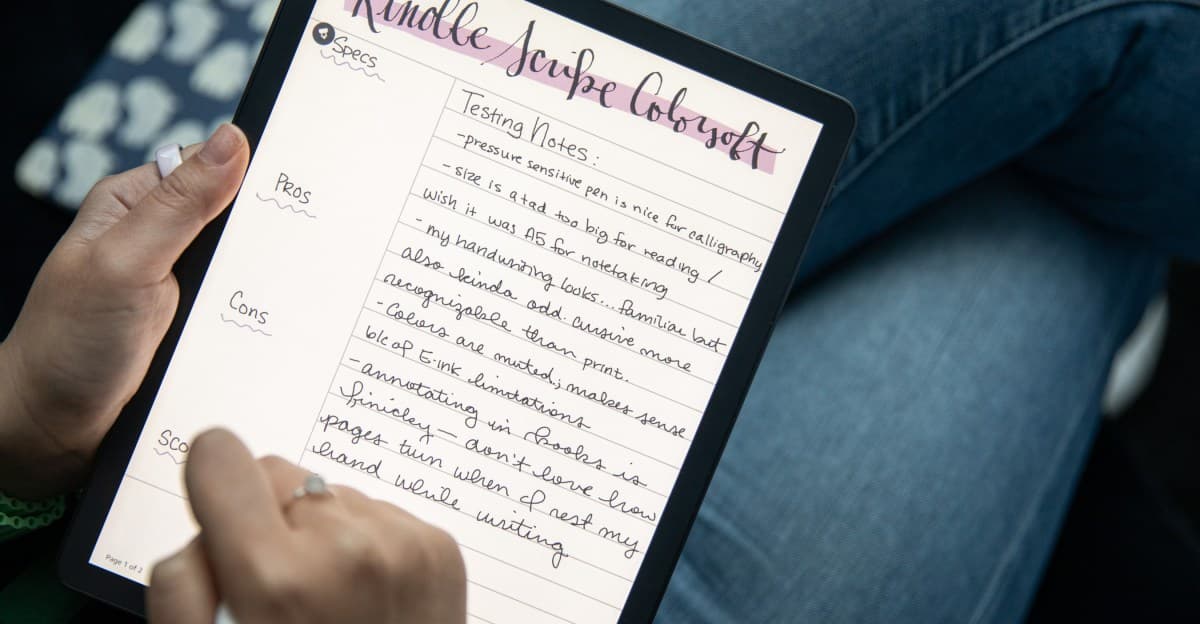
Amazon is rolling out a new “Send to Alexa Plus” feature for the latest Kindle Scribe and Kindle Scribe Colorsoft owners (starting Feb 12). The feature lets you send your notes or documents to Amazon’s AI‑powered Alexa Plus assistant, which can then:

  • Summarize the content

  • Turn it into to‑do lists, calendar events, or reminders

  • Help brainstorm ideas and offer project guidance

I spent about a day testing it, mainly for caregiving tasks. Overall it was helpful, though it has some limitations. It works best when asked to digest information into something actionable.

What I Tested

  • Handwritten notes & PDFs – Alexa accurately summarized both, even when the templates used hard‑to‑read text colors.

  • Logistics – I asked Alexa to turn notes about my mom’s next appointment into calendar events and reminders; it added useful context.

Related

  • Amazon rolls out Alexa Plus nationwide and launches a new free tier

  • 24 hours with Alexa Plus: we cooked, we chatted, and it kinda lied to me

Question‑Answering & Guidance

While on hold with Medi‑Cal for three hours, my Echo Show 8 read back key information from a dispute letter I’d written earlier. I also sent a PDF of an email and asked Alexa to add up a list of charges—it calculated correctly. It was good at pulling specific details; for example, it identified “Blue Shield” from messy handwriting even though I hadn’t labeled it as an insurance company.

In another test, I wrote notes for someone taking my mom to an appointment, deliberately leaving out the address. After clicking Share → Send to Alexa, I asked what might be missing. Alexa suggested adding the address, doctor’s name, medication list, and questions to ask. It also generated a decent draft when I asked for help brainstorming a phone script for arguing with the insurance company, though Alexa couldn’t apply those changes to the original Scribe note or email the full version. I could view the draft in the chat history section of the Alexa app.

Related

  • Alexa is the best frenemy I’ve ever had

  • How caregivers are using smart tech to help aging parents

Depth & Nuance

I wanted to see if Alexa could help me quiz myself on a piece, so I sent a copy of my old Kindle Scribe review and another article. It took four or five attempts to generate a detailed outline, and it sometimes missed subtle distinctions (e.g., interpreting “AI‑powered summarization feature” as just “AI‑powered feature”). This caused it to mark partially correct answers as fully correct.

Overall Verdict

Send to Alexa Plus isn’t perfect, but it’s genuinely useful and gives Amazon an edge over rivals like the Kobo Elipsa 2E, which lacks voice‑assistant integration. The Elipsa 2E is still my favorite for basic annotation, but the Scribe is becoming easier to recommend for users entrenched in Amazon’s ecosystem.


Images

  • Photo by Amelia Holowaty Krales / The Verge (Kindle Scribe)

  • Author photo: Sheena Vasani


End of article.

Read Original Article
0

Comments

Want to join the conversation?

Loading comments...